IndieSEO
Check IndieSEO before you install
Installing an app from a small developer is a fair thing to be careful about. Here is how to check, yourself, that the file you downloaded is ours, unchanged, and what it connects to once it runs.
What you may see on Windows
IndieSEO for Windows is new, so Windows may warn you the first time you run the installer. This is the normal warning for a new app with few downloads so far. It does not mean anything was found in the file.
Choose More info:
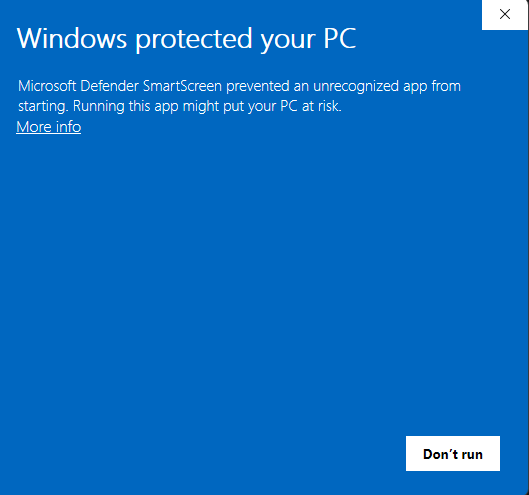
Check that the publisher includes Marcos Arteaga Planas, then choose Run anyway. If the publisher is missing or different, choose Don’t run and write to us.
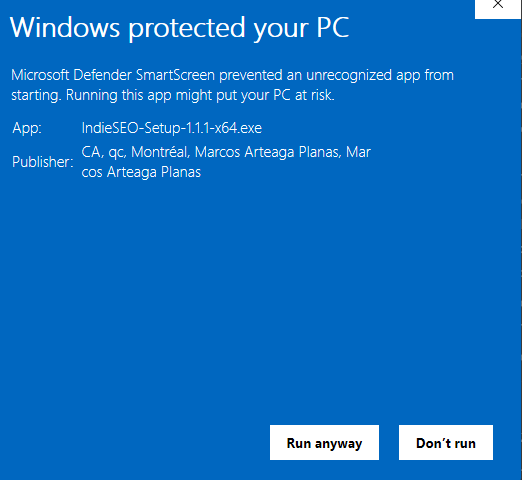
Edge may also say the file “isn’t commonly downloaded”. Choose … then Keep.
1. Check who signed it
Mac. After you drag IndieSEO into Applications, open Terminal and run:
spctl -a -vv "/Applications/FTS IndieSEO.app"You should see accepted, source=Notarized Developer ID and origin=Developer ID Application: Marcos Arteaga Planas (Z6T799T5KZ). Notarized means Apple automatically checked this exact app for malicious software before it was published.
Windows. Before you run the installer, open PowerShell (press the Windows key, type PowerShell, and open Windows PowerShell; Command Prompt will not work) and run:
Get-AuthenticodeSignature "$HOME\Downloads\FTS-IndieSEO-Setup-1.1.4-x64.exe" | Select-Object Status, @{n="Signer"; e={$_.SignerCertificate.Subject}} | Format-ListYou should see Status : Valid and a signer that starts with CN=Marcos Arteaga Planas. Windows shows the same name as the publisher if it warns you before running a new app.
2. Check the file is unchanged
These are the SHA-256 checksums of the current downloads. If your file gives the same value, it is byte for byte the file we published. The commands assume the file is in your Downloads folder with its original name; change the path if yours is elsewhere.
Mac (FTS-IndieSEO-1.1.4-arm64.dmg), in Terminal:
shasum -a 256 ~/Downloads/FTS-IndieSEO-1.1.4-arm64.dmg4f5062bf6b6638131d4a9c320d254a7fdc7dd31518253759ecefddbdaa2f8108
Windows (FTS-IndieSEO-Setup-1.1.4-x64.exe), in PowerShell:
Get-FileHash "$HOME\Downloads\FTS-IndieSEO-Setup-1.1.4-x64.exe"9DBB156D7B0F73E29D8643C65C9349AACB7D9EFED678DF8BA615E706D9E54E5F
3. Ask dozens of virus scanners
VirusTotal checks a file with many antivirus engines at once. Here are the reports for the current downloads:
What IndieSEO connects to
Your scans and results stay on your computer. The app connects only to your website when you scan it, to Google if you connect Search Console, to Polar to check your licence, and to fromtheshower.com to check for updates. It has no analytics, tracking, or crash reporting. The privacy page lists every connection and when it happens.
Ask your coding assistant to check it
If you use Claude Code, Codex or a similar tool, you can ask it to look at the download before you open it. For example:
Before I install this, check the file in my Downloads folder: confirm its code signature and who signed it, compare its SHA-256 with the one on fromtheshower.com/indieseo/verify/, list the web addresses inside the app, and tell me anything that looks unusual.Questions
If anything here does not match what you see, do not install it, and write to support@fromtheshower.com.